

TL;DR: FastMetal-QAD is a family of three open-source video models, 1.3B, 5B, and 14B, built by FastVideo to run natively on Apple Silicon through a new MLX runtime. The 5B generates a five-second 720p clip in 151 seconds and peaks at 9.3 GiB, so 720p fits within 16 GB of unified memory. Fast mode brings the same clip down to 47 seconds. The 14B targets higher-memory Macs for the strongest local quality, the 1.3B is built for the fastest local generation, and both the 1.3B and 5B also run on a fanless 13-inch MacBook Air.
Why a Mac release, and why now
The Mac has become a serious AI platform and continues to improve with every generation. Unified memory lets a laptop-class GPU hold a video model that would otherwise need a discrete card, and MLX now provides a practical path to fused kernels, graph compilation, and quantized formats on Metal. Local AI on Mac has moved from a curiosity to a default for language models. Video generation is the next logical step, and it is a workload we know how to build. So we brought the core FastVideo stack to Mac: the DiT, sampler, and decoder running natively on Metal.
Release lineup
Every model is a three-step student trained with DMD2 and quantization-aware training on the affine INT8 grid, so the precision used during training is the precision shipped at release. Each model is published both as Diffusers safetensors and as a pre-quantized MLX checkpoint, reducing download size and avoiding re-quantization at load time. FastVideo source is Apache-2.0; the vendored TAEHV decoder and MLX RIFE backend are both MIT-licensed.
| Checkpoint | Base | Outputs | MLX DiT Size | TAEHV Size | Mac Tier |
|---|---|---|---|---|---|
FastMetal-1.3B-QAD | Wan2.1-T2V-1.3B | 480p, ~5 s | 1.4 GB | 22 MB | 16 GB+ |
FastMetal-5B-QAD | Wan2.2-TI2V-5B | 480p / 720p, ~5 s | 4.9 GB | 22 MB | 16 GB+ |
FastMetal-14B-QAD | Wan2.1-T2V-14B | 480p / 720p, ~5 s | 14 GB | 22 MB | 36 GB+ |
| FastMetal-1.3B-QAD | FastMetal-5B-QAD | FastMetal-14B-QAD |
|---|---|---|
Speed and memory below were measured on an Apple M4 Max with 36 GB of unified memory, using normal three-step DMD generation, an INT8 DiT, and TAEHV decode. End-to-end time includes prompt encoding, DiT load, denoising, and decode/export.
| Model | Output | End-to-End | Denoise | MLX Peak Memory |
|---|---|---|---|---|
| 1.3B | 480×832×81 | 110.14s | 89.77s | 3.87 GiB |
| 5B | 704×1280×81 | 151.42s | 98.50s | 9.34 GiB |
| 14B | 480×832×81 | 601.82s | 554.22s | 21.68 GiB |
The MLX runtime
FastMetal-QAD introduces native Apple Silicon support in FastVideo through a new MLX runtime: the same models, pipeline, and training code that run on CUDA now have a first-class Metal path. The runtime is designed around MLX and unified memory, layer by layer:
- MLX-first DiT and dense attention. The denoising loop runs on the Metal GPU with
mx.fast.scaled_dot_product_attentionand dense attention. The three-step DMD sampler also runs on-device; no tensor leaves unified memory, and each step is executed as a compiled MLX graph. - INT8 where it matters. Every DiT matrix weight uses affine INT8 (group size 64) through
mx.quantized_matmul; norms and modulation tables remain fp16. - Memory choreography. The umT5 text encoder loads in bf16, encodes once, and is released before the DiT loads. Decoding defaults to TAEHV, Ollin’s small MIT-licensed Wan autoencoder, which costs a fraction of a full Wan VAE decode. Peak memory is therefore set by the largest stage rather than the sum of all stages.
- Pre-quantized checkpoints and prompt caching. Packed INT8 weights, scales, and biases are stored directly; reloads avoid re-quantization, and a content-addressed prompt cache makes repeat generations start in seconds.
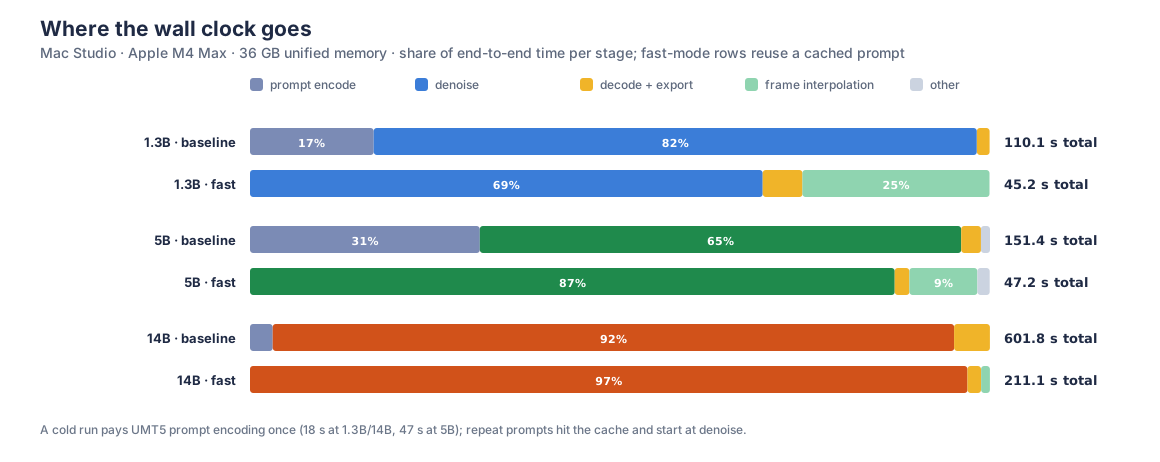
That last point dominates the wall clock on a first run. Encoding a prompt with umT5 costs about 18 seconds beside the 1.3B and 14B DiTs and 47 seconds beside the 5B, which is why a cold 5B baseline reads 151 seconds while its denoising loop takes 98. Every later generation on the same prompt skips straight to denoising, so mode-to-mode comparisons below are clearest in denoise time.
How we chose INT8
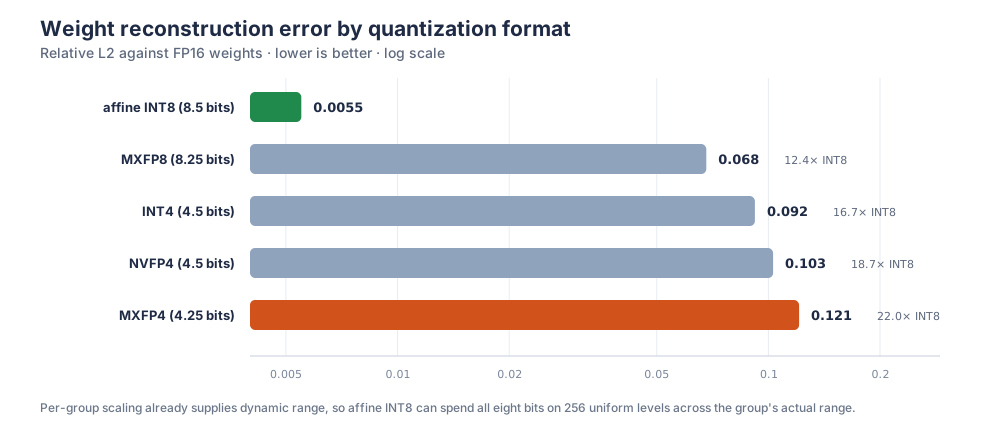
We evaluated candidate low-bit formats by training on them and measuring the result. For now, INT8 is the best option for Apple Silicon: it is the most accurate format we measured at its memory cost and the most reliable choice across Apple generations. MXFP4 and NVFP4 reconstruct weights more than an order of magnitude less accurately at comparable memory, and both our implementations and the underlying frameworks need more work before those paths are the right choice here.
We also evaluated the natural next hypothesis: quantizing activations as well as weights (W8A8) so integer matrix units engage directly. We built a fused int8×int8 Metal kernel and calibrated it against production DiT workloads. It is correct to within 3×10⁻⁶ of the reference, but the current MLX/Metal kernel surface does not yet outperform fp16 at DiT shapes. For this release, INT8 for memory and dense fp16 attention is the right trade.
On the 1.3B, where we have a paired FP16 control, the QAD checkpoint holds MS-SSIM 0.933 against its own FP16 output on the motion7 prompt set, against 0.907 for post-training quantization of the same model. Released checkpoints are selected from human visual review grids.
Generation modes
The runtime offers several composable generation modes, each behind a quality gate. These flags are the whole surface; they work with every model in the release.
- Fast mode,
--fast --fast-factor 2. Generate every Nth frame and interpolate the remainder with Apple-Silicon-nativerife-mlx. A factor of 2 roughly halves diffusion work;--fast-sharpenrestores edge crispness. - Refine mode,
--refine. Generate at base resolution, then run a second denoising pass with the same DiT at higher resolution. No LoRA, super-resolution weights, or additional training are required. - Quality mode,
--decode-backend wan-vae. Use a full Wan VAE decode in bf16 instead of the default TAEHV decode. - Prompt enhancement,
--enhance-prompt. An on-device pre-pass that expands a short prompt into Wan-style cinematic shot language, through either a localmlx-lmmodel or a deterministic template, with an on-disk cache. - Spatial fast mode (experimental),
--fast-spatial. Denoise at a fraction of the target resolution, then bilinearly upsample clean latents before decoding. This avoids a second denoise, reduces token count by approximately scale², and composes with fast mode for fewer frames and fewer pixels. - Draft attention (experimental),
--draft-attention. Windowed attention with sinks for interactive prompt exploration, behind an SSIM quality check. Dense attention remains the default for final renders.
Results
Every clip below is the same prompt per model across all five modes, on the same machine.
| FastMetal-1.3B-QAD 480p | FastMetal-5B-QAD 720p | FastMetal-14B-QAD 480p |
|---|---|---|
| Baseline | ||
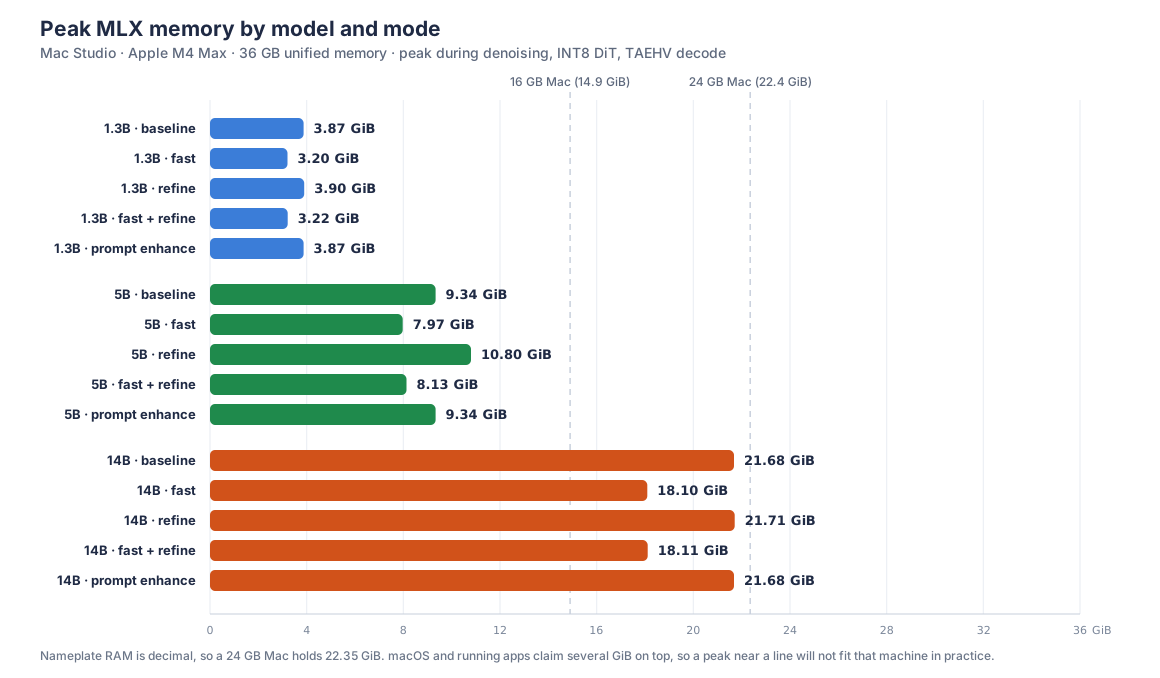
110.14s · 3.87 GiB peak | 151.42s · 9.34 GiB peak | 601.82s · 21.68 GiB peak |
| Fast mode | ||
45.19s · 3.20 GiB peak | 47.24s · 7.97 GiB peak | 211.14s · 18.10 GiB peak |
| Refine mode | ||
100.59s · 3.90 GiB peak | 107.64s · 10.80 GiB peak | 618.06s · 21.71 GiB peak |
| Fast + refine | ||
39.43s · 3.22 GiB peak | 51.58s · 8.13 GiB peak | 237.35s · 18.11 GiB peak |
| Prompt enhancement | ||
112.43s · 3.87 GiB peak | 151.27s · 9.34 GiB peak | 578.96s · 21.68 GiB peak |
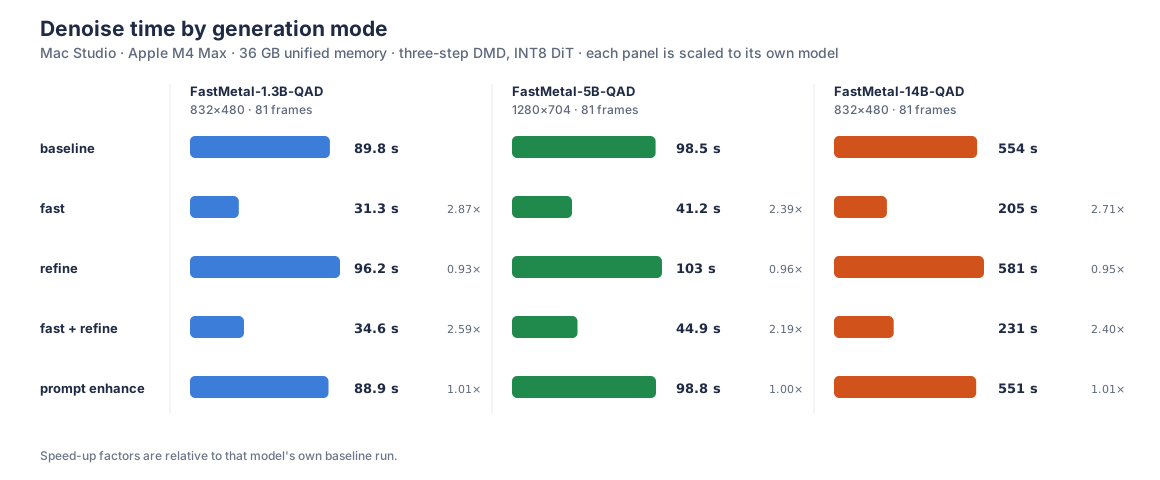
Fast mode is the largest single lever: roughly 2.4x to 2.9x less denoising work at every model size. Refine costs about 5 to 7 percent more denoising than baseline and buys detail rather than speed. The two compose: fast + refine still lands well under baseline while recovering much of what fast mode gives up. Prompt enhancement is free at the DiT: it rewrites the prompt, not the workload.
Memory is what decides which Mac can run what, and nameplate RAM overstates the budget twice over: Apple counts in decimal, so a 24 GB Mac holds 22.35 GiB, and macOS plus whatever else is open takes several GiB of that. The 5B stays under 11 GiB in every mode, which is why 720p is comfortable on a 16 GB machine. The 14B peaks at 21.7 GiB, close enough to a 24 GB Mac’s real ceiling that we target it at 36 GB and above. Refine is nearly free in memory terms: the two-pass path keeps one resident copy of the DiT rather than two.
On a fanless MacBook Air
A Mac Studio is not the constraint this release was designed around, so we repeated the 1.3B and 5B runs on a 13-inch MacBook Air with an Apple M5, 24 GB of unified memory, and a 10-core GPU, a fanless machine with roughly a quarter of the Mac Studio’s GPU cores. Both models run at the same resolutions and in the same modes, output quality is on par at matched settings, and peak memory tracks the Mac Studio within a few hundred MiB. The Air trades that for roughly 1.3x to 2x the wall clock.
| Model | Mode | Avg Total | Avg Peak |
|---|---|---|---|
| 1.3B | Baseline | 156.2s | 3.70 GiB |
| 1.3B | Fast | 58.2s | 2.71 GiB |
| 1.3B | Refine | 149.0s | 5.14 GiB |
| 1.3B | Fast + refine | 75.7s | 4.14 GiB |
| 5B | Baseline | 200.1s | 9.54 GiB |
| 5B | Fast | 90.7s | 8.11 GiB |
| 5B | Refine | 154.9s | 9.46 GiB |
| 5B | Fast + refine | 111.5s | 7.54 GiB |
The 1.3B rows are 832×480, 81 frames; the 5B rows are 1280×704, 81 frames. The 14B does not fit this machine at 81 frames, since 24 GB constrains it to shorter clips, which is why the release targets it at higher-memory Macs.
How to run
Each release checkpoint is self-contained, so one download is all you need:
uv pip install -e '.[mlx]'

hf download FastVideo/FastMetal-1.3B-QAD --local-dir ./FastMetal-1.3B-QAD
On an older Hugging Face CLI, use huggingface-cli download with the same arguments. Swap the repo name for FastMetal-5B-QAD or FastMetal-14B-QAD to pull the other releases.
The Wan2.1 models, 1.3B and 14B, use the standard MLX text-to-video entrypoint:
python examples/inference/basic/mlx_wan_prompt_to_video.py \
  --model-root ./FastMetal-1.3B-QAD \
  --mlx-checkpoint ./FastMetal-1.3B-QAD \
  --height 480 --width 832 --num-frames 81 \
  --prompt "A fox runs through a misty pine forest, leaves kicking up behind it."
For 14B, point both flags at ./FastMetal-14B-QAD instead. That repo also ships an EMA-smoothed variant: keep --model-root at the repo root and set --mlx-checkpoint ./FastMetal-14B-QAD/ema.
The Wan2.2 5B release uses its dedicated TI2V entrypoint because its latent geometry and timestep conditioning differ from Wan2.1:
python examples/inference/basic/mlx_wan22_generate.py \
  --mlx-checkpoint ./FastMetal-5B-QAD \
  --text-encoder-root ./FastMetal-5B-QAD \
  --vae-root ./FastMetal-5B-QAD/vae \
  --height 704 --width 1280 --num-frames 81 \
  --prompt "A cinematic portrait with soft neon lighting and smooth camera motion."
Both commands reproduce the numbers in this post, and the defaults are the release configuration. The Apple Silicon guide covers fast reloads, memory tiers, and troubleshooting.
What’s next
FastMetal-QAD is the beginning of the Mac track. The near-term work is making denoising faster and clips longer, and promoting spatial fast mode and draft attention out of experimental status. After that, more FastVideo model families reach the Mac path, including QAD releases distilled specifically for Apple Silicon rather than ported to it.
Image-to-video is a major next step. Our goal is to bring workflows such as Dreamverse, FastVideo’s interactive vibe-directing workspace, from high-end server hardware toward local and consumer systems. We expect this to require both runtime work and new Mac-oriented distillation/quantization recipes.
We welcome feedback, contributions, and collaboration. If you have a feature or model request, join our Slack channel or open an issue in the FastVideo repo. To contribute, see Contributing to FastVideo.
Acknowledgements
The base models are Wan 2.1 and 2.2 from the Wan team at Alibaba. The recipe builds on DMD2 by Tianwei Yin and coauthors, and continues the work of everyone who shipped FastWan-QAD.
On the Mac side we vendor TAEHV by Ollin Boer Bohan for decoding and rife-mlx for frame interpolation, itself an MLX port of Practical-RIFE by hzwer. The runtime rests on MLX and the community around it.
Training ran on NVIDIA GB200 GPUs. Thank you to NVIDIA for the compute and the Blackwell-era tooling the QAD recipe builds on. We also want to thank the vLLM, vLLM-Omni, and MBZUAI teams for sponsoring and supporting FastVideo.
FastVideo team
Contributor: Aryan Kumar
Tech lead: Will Lin
Advisor: Hao Zhang