


Video generation should keep creators in the loop, not pull them out of it. In our previous Dreamverse post, we introduced vibe directing: a workflow for steering video generation through fast, natural-language iteration. Today, FastVideo is making that workflow open source by releasing the Dreamverse frontend and backend as a reference application for real-time generative video systems. Dreamverse is based on a version of LTX’s open weights diffusion model, LTX-2. Optimized for a single NVIDIA B200 GPU, Dreamverse gives developers the full stack to build their own real-time generative video applications on FastVideo.
What Is FastVideo’s Dreamverse?
Dreamverse is a real-time video generation workspace for vibe directing. It is to video what vibe coding is to software: start from a simple idea, watch the result, and keep steering with natural language. Keep the subject, change the camera, continue the scene, or try another direction, all within a quick iteration loop.

Edit Video Background

Edit Video Character
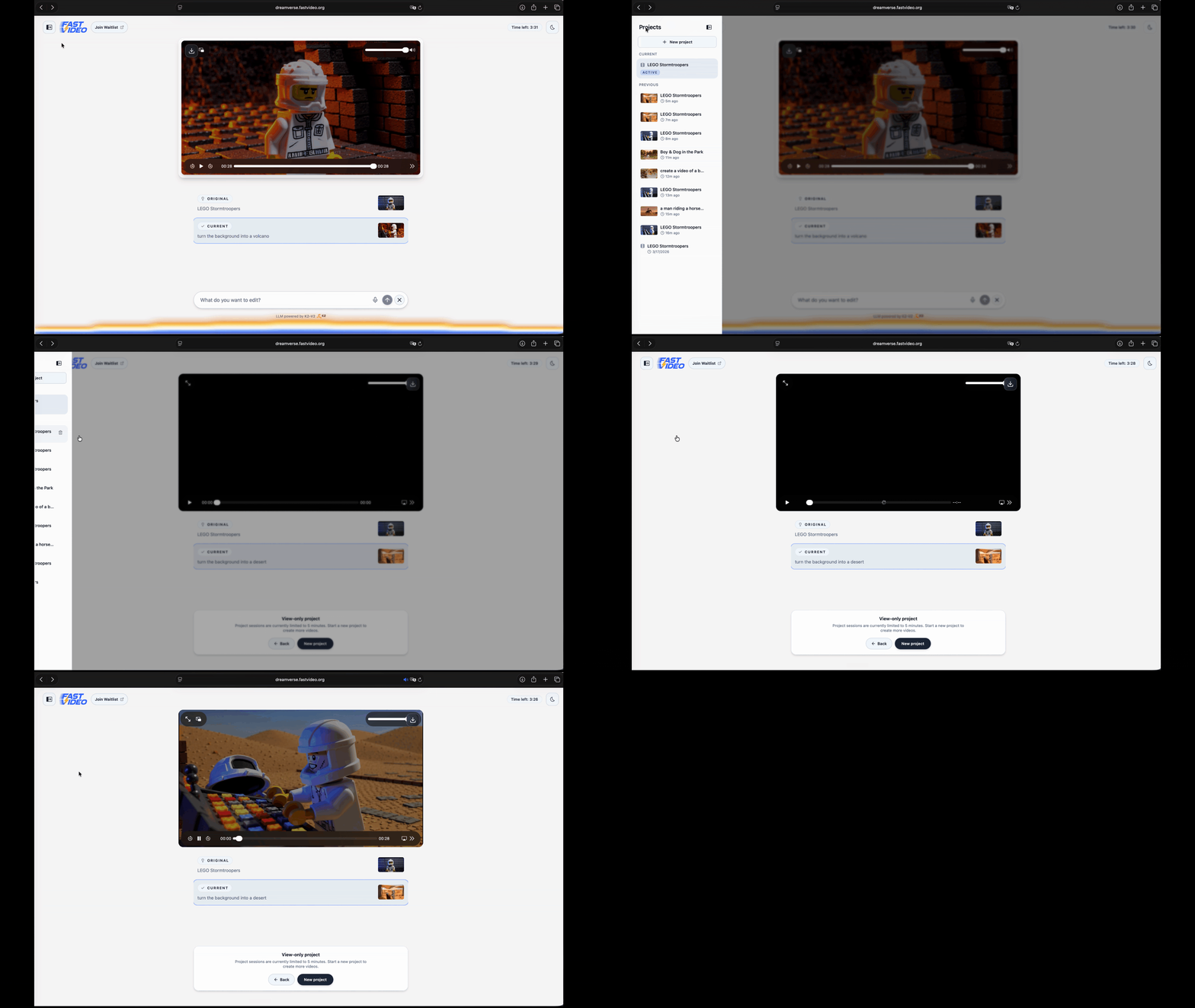
View history generations from Gallery
With this release, Dreamverse becomes not only a runnable product prototype, but also a sample architecture for the FastVideo community building real-time video generation and editing applications.
What We Are Releasing
FastVideo designed Dreamverse to be a self-hostable application inside the FastVideo ecosystem. You can use your own NVIDIA B200 GPU or rent one from a cloud GPU provider, launch the runtime, and edit directly from your browser. This release includes:
- a browser workspace for directing and editing generated scenes
- a FastVideo backend runtime for prompt handling, GPU workers, and streaming
- an NVIDIA Blackwell-optimized generation path with NVFP4 inference, FA4, and torch compile, built on LTX-2
- prompt rewriting for edits, continuations, and longer scene control
- tests, benchmarks, mock backend support, and Docker images for development and deployment
How To Run Dreamverse
Running Dreamverse is meant to be simple. Dreamverse is supported on NVIDIA B200 GPUs for the real-time generation path, and each Dreamverse worker occupies one NVIDIA B200 GPU for its workload. We also provide a Docker image for simple deployment with the generation dependencies already installed. Dreamverse deploys on a local GPU, a self-hosted B200 server over SSH, Docker, or serverless Modal — for detailed instructions and scripts, see the Dreamverse README.
To start the backend Dreamverse server, simply run:
uv pip install "fastvideo[dreamverse]"
dreamverse-server --host 0.0.0.0 --port 8009
The backend also exposes liveness and readiness endpoints for checking whether the server is running and ready to generate.
curl http://localhost:8009/healthz
curl http://localhost:8009/readyz
After the server is ready, start the web app from the Dreamverse frontend package in another terminal:
pnpm install --frozen-lockfile
BACKEND_HOST=localhost BACKEND_PORT=8009 pnpm run dev
Then open the frontend URL to start your generations!
If you want to work on the frontend without a GPU, simply start the mock backend instead. It sends pre-generated video through the same websocket and streaming path as the real backend:
dreamverse-mock-server --latency 200 --port 8009
How Dreamverse Works
The browser workspace is where you direct the scene. You type prompts, review generated clips, edit the prompt sequence, and ask Dreamverse to rewrite the rollout. The browser sends those requests to the Dreamverse runtime, then plays each new video segment as it streams back.
The Dreamverse runtime is the bridge between the browser workspace and the backend generation stack. It manages the frontend-backend message queue, the current session working memory, prompt memory, prompt enhancer, prompt rewriter, prompt safety, and the lifecycle of GPU workers. When the browser sends a request, the runtime decides which backend component should handle it and what prompt sequence is accepted for generation.
User
  |
  v
Browser workspace
  |  prompts, rewrites, session controls
  |  video/audio chunks
  v
Dreamverse runtime
  |  session state, prompt memory, safety, rewrite
  v
GPU worker pool
  |  one worker per visible GPU
  v
FastVideo generator
  |  LTX-2 video + audio segments
  v
fMP4 streaming layer
  |  fragmented MP4 over websocket
  v
Browser playback
After a user prompt reaches the runtime, the prompt pipeline can run safety checks and rewriting before generation. The safety filter uses fastText classifiers for NSFW and hate-speech detection when enabled. The prompt rewriter then expands the user’s instruction into a detailed prompt for the next segment. Dreamverse provides a curated system prompt and a continuation prompt for this job, preserving user intent while adding details such as camera movement, actor movements, and scene context. This makes each continuation smoother and more logical while still letting the user steer at the level of intent. To keep that rewriting step inside the real-time loop, Dreamverse uses low-latency LLM endpoints from providers such as GroqCloud, powered by first generation LPUs.
The GPU worker pool launches and manages the worker processes that run generation. Each worker owns one GPU, loads the FastVideo generator, and serves one active user session at a time. When a user starts a session, the runtime connects them to an available worker slot; if no slot is free, the user waits in a queue until one opens.
The FastVideo generator API produces each segment and carries the main inference optimizations used by Dreamverse. We use torch.compile across the major pipeline stages, including text encoding, the DiT, and VAE. We also remove graph-break points where possible so more of the pipeline can stay compiled. For attention, we use FA4 flash-attention, built specifically for Blackwell GPUs, and make it compatible with the compiled path. For transformer linear layers in the video path, we optimize speed and memory with NVFP4, NVIDIA’s block-scaled FP4 format, so computation can use B200 Tensor Cores more efficiently. After each segment, the worker keeps the final video frames and audio latents as conditioning information. With this conditioning, the next segment can then continue from the previous one instead of starting from an unrelated blank state, including smoother audio and visual continuity across segment boundaries.
Lastly, the streaming layer turns generated frames and audio into fragmented MP4 (fMP4). Instead of waiting for a full file to be written and downloaded, Dreamverse pipes frames into FFmpeg, produces fMP4 chunks, and publishes those chunks immediately. For lower-latency streaming, the release includes a native FFmpeg build script that builds FFmpeg with libx264 and link-time optimization (LTO). The browser receives the chunks over the websocket and appends them to its playback buffer for streaming playback. This allows the interface to feel like a live directing session rather than a section-by-section generation.
Next Steps
We are actively expanding Dreamverse to support new models, system optimizations, and video editing features. In particular, we are exploring training-aware methods such as Attn-QAT with NVFP4 attention to support Dreamverse on NVIDIA RTX 5090s, 4090s, and even 3090s, stay tuned!
We welcome and value any feedback, contributions, and collaboration. If you have a feature or model request for Dreamverse, feel free to join our Slack channel or submit an issue at our repo (tag scope:dreamverse). To contribute, please check out Contributing to FastVideo for how to get involved!
Acknowledgement
We thank NVIDIA, Institute for Foundation Models, MBZUAI for supporting our development, and LTX for creating and releasing LTX-2 to the community via open weights.
FastVideo Team
Core contributors: Junda Su*, Minshen Zhang*, Will Lin* (* equal contribution)
Contributors: Matthew Noto*, Yechen Xu*, Peiyuan Zhang*, Shao Duan, Loay Rashid, Kevin Lin, Kaiqin Kong
UI: Tina Mai
Tech leads: Will Lin, Hao Zhang
Advisors: Hao Zhang (corresponding), Danyang Zhuo, Eric Xing, Zhengzhong Liu